For iPhone
Your Zone 2 ceiling. Measured, not guessed.
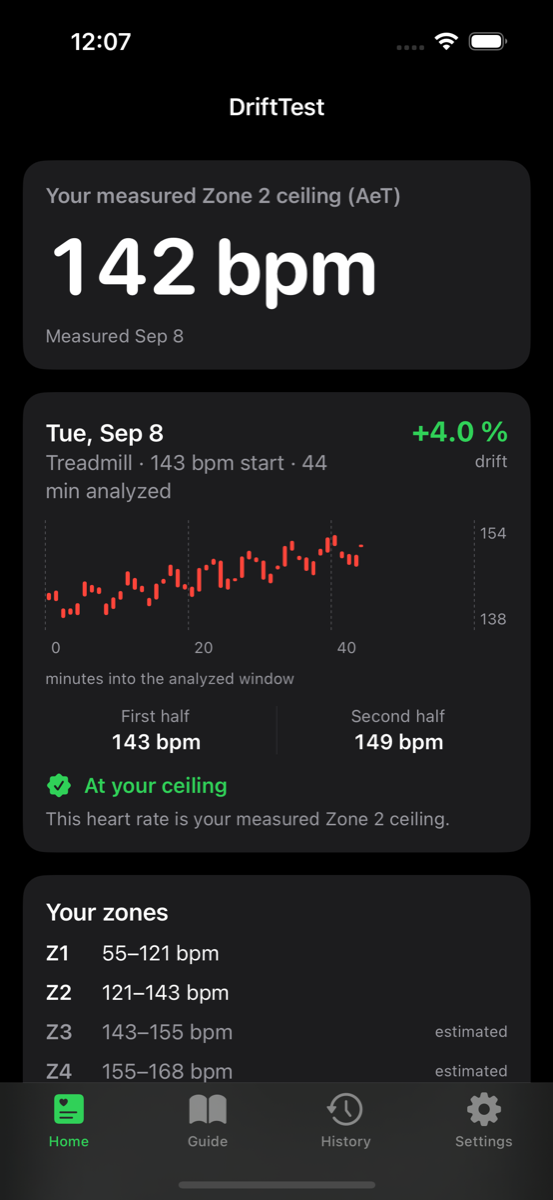
Age formulas put your aerobic threshold somewhere in a 15-beat band. DriftTest finds your own number using a simple field test. Hold one steady pace for 40 to 60 minutes and see exactly how much your heart rate drifts.
How it works
- Get a starting heart rate. DriftTest gives you a first target based on your age and resting heart rate. Every test after that uses your own measured data.
- Run the test. Warm up, lock one speed on the treadmill or hold a steady pace on a flat route, and keep it constant for 40 to 60 minutes. Record the session with your Apple Watch, Garmin, Polar, or COROS device.
- Read the drift. Select the run and isolate the steady block on the chart. DriftTest computes time-weighted heart-rate means for each half of the window, measures the cardiac drift between them, and grades it against the aerobic threshold band. Below the band, you were under your ceiling. In it, you were on it. Above it, you were over.
- Get your zones. Once a test lands in the correct band, DriftTest calculates your Zone 2 ceiling and sets the training zones that follow from it.
A prescribed test
No guesses pulled from your mixed workout history. You know exactly what was evaluated because you isolate the exact data block on the chart yourself.
Treadmill or road
Indoors, the belt holds the pace for you. Outdoors, DriftTest cross-checks your pace against your heart rate so an unnoticed slowdown cannot hide the drift.
Apple Watch or a .fit file
Import Apple Watch workouts directly from Apple Health, or use a .fit file exported from a Garmin, Polar, or COROS.
Private by design
No accounts, no servers, and no analytics. Your health data is processed locally on your iPhone and never leaves the device.
Free to download. One-time purchase to unlock the result — no subscription.